ACCOUNT & BILLING
Credits, plans & billing
Compare plans and credit packs, understand monthly allowances, view Usage, manage a trial, and find billing help.
Verified against AI NetShell 0.4.11
Purpose#
Choose the AI NetShell plan that matches the work you need to do, understand how plan and pack credits are used, and find current usage and billing controls.
AI credits are the fuel used by Included AI. Prepaid credit packs unlock the full read-only Included AI experience on Free and top up every paid tier. Pack credits fund Included AI but do not change plan entitlements.
An AI credit is a metered unit of Included AI usage, not one question or one investigation. The selected model and the actual input and output used determine the charge, so longer work can spend more. Premium-model runs spend AI credits at a higher rate. AI NetShell shows the measured spend for each investigation and your live balance instead of promising a fixed number of investigations per pack.
Before You Begin#
All prices below are in US dollars. Lemon Squeezy is the merchant of record and handles checkout, payment, tax, receipts, subscription changes, and billing records.
A card is required for the monthly Resolve offer's trial. If you use Your own AI on an eligible plan, that provider bills its use separately and the requests use no AI credits.
Steps#
1. Compare plans#
| Plan | Monthly | Monthly AI credit allowance | What it includes |
|---|---|---|---|
| Free | $0 | None. Add prepaid packs as needed. | The full read-only Included AI experience when pack credits are available, including investigations across many open devices at once. Manual device import, manual backups for one device at a time, configuration comparison, and snippets are included. No Active Discovery, maps, lifecycle views, scheduled discovery and drift alerts, map and client deliverables, Your own AI, or governed writes. |
| Investigate | $29 | 500 credits | Pay as you go capabilities plus operational maps, Active Discovery and scheduled discovery, topology run comparisons, drift alerts, discovery backups, and lifecycle views. Maps are viewed on screen. Exports and documentation come with Resolve. |
| Resolve | $59 | 1,500 credits | Investigate capabilities plus governed changes with rollback, map exports (Map image (.png) and Printable map (.pdf)), client documents, and separate pre-change checkpoints. Exports on a paid Resolve month carry no AI NetShell watermark. |
| Resolve 6K | $149 | 6,000 credits | The same capabilities as Resolve. Only the monthly AI credit allowance differs. |
Included AI offers Claude Sonnet 5.5 and Claude Haiku 4.5 on pay as you go and Investigate. Resolve and Resolve 6K also offer Claude Opus 5.5.
Exports come with Resolve and Resolve 6K. During the Resolve trial they carry the AI NetShell watermark, the line Made with AI NetShell · ainetshell.com. Exports on a paid Resolve or Resolve 6K month carry no watermark. The as-built report from Document this network… carries the AI NetShell logo on its cover, on a paid month too; that logo is not the watermark. The report also ends with the line Prepared with AI NetShell · ainetshell.com on a paid month. The app has no setting for your own logo or business name on exports. White label coming soon.
On Investigate, you can view maps on screen in every view, but map and documentation exports are locked. This includes exports from saved runs. The export controls stay visible with the line Exports and documentation are part of Resolve. and a link to change your plan.
Plan credits are a monthly allowance. Unused plan credits do not roll into the next period. In the app, the allowance is shown as a percentage used instead of a raw remaining-credit number.
2. Add a credit pack when needed#
| Pack | Price |
|---|---|
| 600 credits | $15 |
| 1,750 credits | $40 |
| 4,000 credits | $85 |
Pack credits are prepaid exact credits. They do not expire and are used automatically when a paid tier's monthly allowance runs out. Credits with an expiration are consumed first, so the monthly allowance is used before non-expiring pack credits.
Credit packs top up every tier. On Free, a pack powers the full read-only Included AI experience. Spending stops when the balance reaches zero. Packs do not unlock Active Discovery, maps, lifecycle views, scheduled discovery and drift alerts, map and client deliverables, Your own AI, or governed writes.
3. View your balance in the app#
- Open Settings.
- Select Usage.
- Under Usage, review:
- Your plan for the connected plan name, current catalog price, and billing interval
- This month's usage for the percentage used and reset date
- Credit packs for the exact remaining pack-credit count
- The live pack offers and prices available for the connected account
- Billing for the payment-method and invoice links
- Select Refresh to re-read usage and credits.
Beside Your plan, Change plan opens the right place for your account. If you already pay for a plan, including the Resolve trial, it opens the Billing portal page on your account site, which sends you straight to your own Lemon Squeezy billing portal, and the pane notes: Opens your billing portal. A new plan's features start right away; its credits and price start at your next renewal. Without a paid plan, it opens the pricing page. When the app cannot tell yet, the button reads Plans and billing and opens your account page.
If no account is connected, the pane says Sign in to see your plan, credits and pack prices. Select Sign in and complete browser approval first.
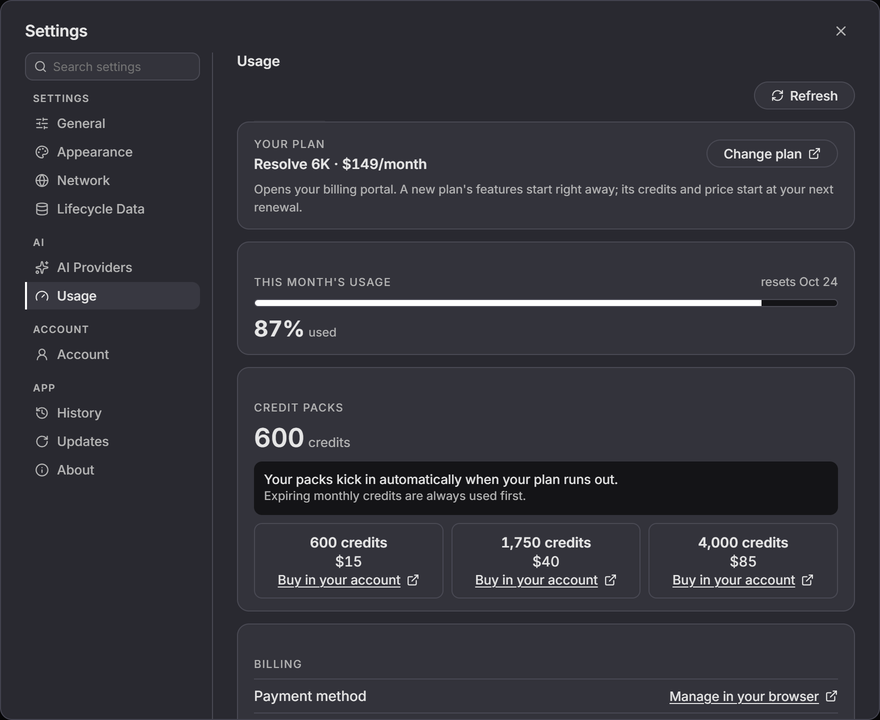
The app uses expiring monthly credits before pack credits. It does not ask for or store card details. The billing and credit-pack buttons open a page on the account site in your browser. (Change plan opens the public pricing page when you have no paid plan.) If your browser is already signed in to the account site, the page opens at once. If not, you sign in to the website once, and then you land on the page you asked for. Buy in your account beside a pack opens the Credit packs card on your account page, where you buy the pack. Manage in your browser (payment method) and View in your browser (invoices and receipts) open your billing portal.
4. Start or cancel the Resolve trial#
The monthly Resolve offer includes a 7-day trial. A card is required, and the offer converts to monthly Resolve when the trial ends.
To open the cancellation flow, use your account's Billing and cancellation page and select Cancel your plan in Lemon Squeezy. See Your account for the full path. For licensing, charging, refundability, and cancellation consequences, see the Terms of Service and Refund Policy.
5. Review app behavior after subscription access changes#
When subscription access changes, Discovery results, maps, drift alerts, lifecycle, and other subscription views clear from the current screen. Saved discovery records are not deleted, and the app reloads available records after subscription access is restored. Manual backups for one device at a time keep working.
6. Manage billing or request a refund#
Use the Lemon Squeezy customer portal from your AI NetShell account, your receipt, or Change plan, Manage in your browser or View in your browser under Settings > Usage to change the payment method, view invoices and receipts, or cancel a subscription. You can switch between Investigate, Resolve and Resolve 6K any time in the billing portal. The new plan's features apply right away; your new monthly credit allowance and price start at your next renewal.
For refund eligibility and request instructions, use the routed Refund Policy. The Terms of Service and Privacy Policy explain the related service and data terms.
Expected Result#
You can identify subscription capabilities and monthly allowances, use prepaid packs for read-only Included AI on any tier, view the percentage used with its reset date and the exact pack balance under Settings > Usage, and recognize the app behavior after subscription access changes.
Troubleshooting#
Usage and billing cannot load#
Confirm the internet connection and connected account, then select Try again or Refresh. If the failure comes from the account session, select Open Account beside Try again. The pane shows no number when the credit service cannot provide a current grant breakdown, rather than showing a potentially stale balance.
No monthly percentage appears#
Accounts without a monthly plan allowance show that no monthly plan credits are available. If a paid plan should be connected, open Settings > Account, select Refresh, then return to Usage.
Pack credits appear lower than expected#
Select Refresh. Pack credits take over automatically after the monthly allowance is exhausted. If the exact count still does not match the purchase, contact [email protected] with the Lemon Squeezy order number.
The account shows credits owed#
The pane says This account owes n credits. New credits pay off the balance before they can be spent. Buy or receive enough credits to clear the displayed amount before expecting a spendable balance. If the amount does not match your records after Refresh, contact [email protected] with the relevant order or receipt number.
The billing portal does not open#
The Billing portal page on the account site opens your own billing portal. If it cannot, it opens the general Lemon Squeezy portal, which asks for your email and sends you a sign-in link. If no billing portal is available, the page says We could not open your billing portal. Use the customer-portal link in your Lemon Squeezy receipt, or contact [email protected].
A pack went to the wrong account#
The account page opens for whichever account your browser is signed in to on the account site. A pack bought there goes to that account. Check which account the page shows before you buy. If a pack landed on the wrong account, contact [email protected] with the Lemon Squeezy order number.
The trial is not offered#
Confirm that you selected the monthly Resolve offer and are using the intended AI NetShell account. For trial eligibility, see the Terms of Service.