GUIDES
Troubleshoot a VPN user who can't reach a server
A VPN user is connected but cannot open one server. Check the session, the access list and its match counters on Cisco IOS XE, then fix it with one permit line.
Verified against AI NetShell 0.4.15
A remote-access VPN user is connected. The tunnel is up, other things work, and one server still will not open. This guide walks through the manual checks on a Cisco IOS XE router, then shows the same ticket worked in AI NetShell, from a real recording.
The example follows the ticket in the recording: the CFO cannot open the accounting server from home. The router is edge-rtr1, the VPN pool is 10.8.0.0/24, the accounting server is 10.2.5.20, and the access list that decides what VPN users may reach is called VPN-USERS.
Why a connected VPN user still cannot reach one server#
When the tunnel is up and only one destination fails, the cause is usually one of four things:
- An access list on the VPN interface denies that destination.
- A split-tunnel list does not send that subnet into the tunnel.
- The router has no route to the server, or NAT gets in the way.
- The server itself, or a firewall in front of it, blocks the VPN subnet.
The first is the quickest to prove, because the router keeps a match counter on every access-list line. Start there.
Step 1: Confirm the VPN session is really up#
Do not take "connected" from the client. Read it from the router.
show crypto session detailLook for the user's session and its status. On IOS XE the line reads Session status: UP-ACTIVE. The Phase1_id names the peer, which is the user's laptop in this example. Anything else is a tunnel problem, not an access problem.
Example output, trimmed:
Interface: Virtual-Access1
Profile: VPN-USERS
Session status: UP-ACTIVE
Peer: 203.0.113.2 port 500
      Phase1_id: cfo-laptop.lab.local
  IKEv2 SA: local 203.0.113.1/500 remote 203.0.113.2/500 Active
Step 2: Find the address the user was given#
Access lists match on the VPN address the router assigned, not on the user's home address.
show crypto ikev2 sa detailed
show ip local pool
In the IKEv2 detail, look for Assigned host addr. In the pool output, check which addresses are in use. In the recording, the pool VPN-POOL handed the CFO 10.8.0.14.
Step 3: Find which access list applies to VPN users#
The access list can sit on the virtual template that builds each VPN session.
show running-config interface Virtual-Template1Look for ip access-group <name> in. In the example it reads ip access-group VPN-USERS in. To confirm the list is active on the user's live session, read the virtual-access interface the session is using:
show ip interface Virtual-Access1Look for Inbound access list is VPN-USERS.
show hosts resolves a name such as ACCT-SRV if the router keeps host entries. Here it resolves to 10.2.5.20.
Step 4: Read the access list top to bottom and check the counters#
show access-lists VPN-USERSRead it in order. The router stops at the first line that matches, so a deny above a permit wins even if the permit is wider. Then read the match counters in brackets. A deny line with a climbing count is traffic being dropped right now.
Example output, trimmed and consistent with the recording:
Extended IP access list VPN-USERS
    10 permit udp 10.8.0.0 0.0.0.255 host 10.2.5.53 eq domain
    20 permit tcp 10.8.0.0 0.0.0.255 host 10.2.5.10 eq 443
    30 permit tcp 10.8.0.0 0.0.0.255 10.2.5.0 0.0.0.255 eq 445
    40 deny ip 10.8.0.0 0.0.0.255 host 10.2.5.20 (large match count)
    50 permit ip 10.8.0.0 0.0.0.255 10.2.5.0 0.0.0.255
Here is the cause. Line 40 denies the whole VPN pool, 10.8.0.0/24, to the accounting server. Line 50 would permit the traffic, but it never gets a turn. Line 30 covers only TCP 445. Nothing above line 40 lets the CFO's address through.
Read the remarks too, with show running-config | section ip access-list. Here the remark above the deny says "finance only, exceptions by host". That is the design: the deny stays, and each person who needs the server gets a host-specific permit above it.
Step 5: Fix it with one permit above the deny#
Add one line, numbered so it lands above the deny. Do not remove the deny, and do not widen the permit to the whole pool, or you undo the policy the remark describes.
configure terminal
 ip access-list extended VPN-USERS
  36 permit ip host 10.8.0.14 host 10.2.5.20
 end
Sequence 36 is any unused number between the remark at 35 and the deny at 40. Check that the number is free before you use it. If you need a narrower rule, permit only the TCP ports the server uses instead of ip.
One caveat: the pool in the example holds a single address, so the CFO's address is stable. On a larger pool the user can get a different address next time, and a per-user static address is the longer-term answer.
Step 6: Verify the fix#
Read the list again and watch the new line's counter.
show access-lists VPN-USERSLine 36's count should climb while the user tries the server, and line 40's should stop. If line 36 is not matching, check the route and NAT toward the server:
show ip route 10.2.5.20
show ip nat translations | include 10.8.0.14
When you are satisfied, save the running configuration to startup, in whatever form your change process requires.
How AI NetShell does the same investigation#
The CFO ticket above is a real recording in the app on a lab router. You can watch the narrated version on the features page (1:23). Here is what happens in it, step by step.
You ask. With the router's terminal open, you type the ticket to Lina, the assistant built into AI NetShell: "The CFO can't open the accounting server from the VPN. Why?"
Lina reads the router, read-only. She lists each read before it runs. In this recording she opened the remote-access-vpn playbook, then ran, in order: show crypto session detail, show running-config | section ip access-list, show hosts, show crypto ikev2 sa detailed, show ip local pool, show ip interface Virtual-Access1 | include access list and show access-lists VPN-USERS. You can set the app to confirm each read before it runs, or to approve the whole read plan once. See Investigate.
She shows the evidence. Her answer names the device and command behind every fact: the session is UP-ACTIVE as cfo-laptop.lab.local, the assigned address is 10.8.0.14, ACCT-SRV resolves to 10.2.5.20, and entry 40 denies the whole pool to that server with a large match count. VPN-USERS is applied inbound on the CFO's Virtual-Access1. She also says what she did not read: the route to the server and the server's own firewall, so check those if the fix does not work. The finding carries the tag "Lina's conclusion".
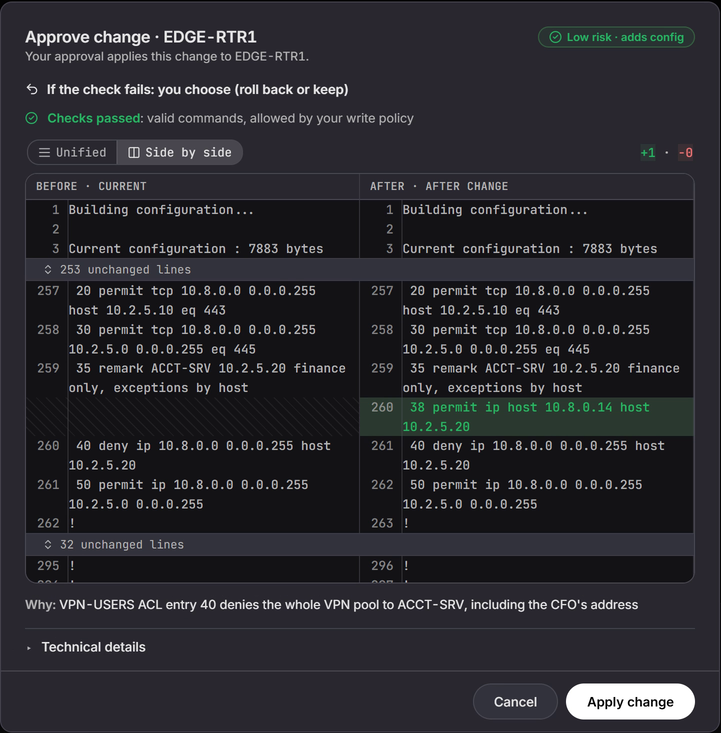
She drafts the fix. One finding, one fix: ip access-list extended VPN-USERS then 38 permit ip host 10.8.0.14 host 10.2.5.20, a host permit above the deny at 40, as the remark asks, and nothing is removed or renamed. You can copy the commands and run them yourself on any plan. Copying runs nothing on the device.
Nothing changes until you approve it. With Resolve, you choose "Apply as governed change". The app checks each line against the router's write policy, saves a copy of the running configuration as the rollback point, and shows an approval card: the device name, the risk (Low risk, adds config), one line added and none removed, the exact line between 35 and 40, and the reason. Nothing is sent until you click "Apply change". See Resolve and Change safety.
It checks the router again. After the change, the app reads the device on its own and reports in plain words. In this recording the result was "Intended outcomes verified", with "Entry 38 in VPN-USERS reads permit ip host 10.8.0.14 host 10.2.5.20", interface state unchanged, no new interface errors, and the route table unchanged.
The CFO is in. The recording ends with show access-lists VPN-USERS run twice: the count on line 38 climbs from 9 to 13 matches and line 40 stops. Roll back stays one click away, and the app asks before it rolls anything back.